
The quick version
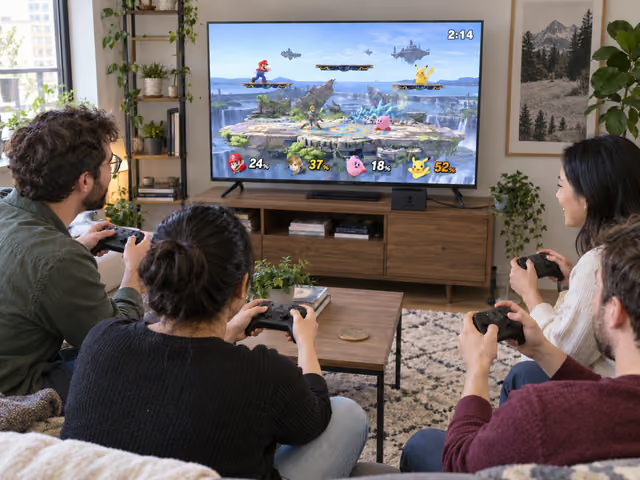
Seat 2–4 players around one TV, connect a controller for each and open Smash → Smash. Choose Time, 3:00, items None, FS Meter Off and Spirits Off; use Battlefield with stage hazards and Stage Morph Off. Play a practice battle, then three scored battles. Move with the left stick, jump with X/Y, attack with A and use B for special moves. Return toward the stage with a remaining jump and your fighter's recovery move. Most points when time expires wins; let the game resolve Sudden Death and show the result.
Saved on this device only — clearing your browser's cache or site data removes them (no account backup).
Connect everyone and save a simple preset
Use the Nintendo Switch game Super Smash Bros. Ultimate, physical or installed digital copy. Nintendo's U.S. support page lists version 13.0.5 on October 2, 2026. Check the installed version before guests arrive and allow time for installation or updates. This guide uses an original Switch or Switch OLED in TV mode; Switch Lite cannot use that TV setup. It does not describe a separate Switch 2 edition, online matchmaking, local wireless between consoles or a tournament bracket.
Bring one working console, its compatible dock and power adapter, an HDMI cable, one TV or monitor, the playable game, and 2–4 charged Nintendo Switch Pro Controllers or pairs of Joy-Con, one full controller set per player. Provide seats with an unobstructed screen view and a safe cable route. A pair of Joy-Con counts as one full controller here. Single sideways Joy-Con and GameCube controllers are supported by the game but use different button layouts; the instructions below assume Pro Controllers or paired Joy-Con. Internet may be needed to prepare the software or digital access, but the actual shared-console battles do not use online play or require a Nintendo Switch Online subscription.
From the game menu choose Smash → Smash, create a rules preset and name it something recognizable. Set Style to Time, Limit to 3:00, Items to None, FS Meter to Off, Spirits to Off and Damage Handicap to Off. In Advanced use First to 1 Win, Stage Morph Off, Stage Hazards Off, Launch Rate 1.0×, Underdog Boost Off, Pausing On, Score Display On and Show Damage Yes. Use ordinary unmodified fighter balance. These are this guide's host choices, not an official competitive ruleset.
Select the standard Battlefield stage: a main platform with three smaller platforms above it. On the fighter screen leave the battle as free-for-all, add only your human players and remove unwanted CPU slots. Pair controllers first if necessary; press L and R together for each Pro Controller or paired Joy-Con to join. Each person chooses an available fighter and checks their player number, color and portrait. An unmodified save already offers starter fighters such as Mario, Link, Kirby and Pikachu; the entire advertised roster is not necessarily unlocked on your console. DLC is optional. Duplicate fighters are fine; use different costumes to help track them.
Learn the buttons before counting wins
Confirm each player's selected name and control layout. Old custom profiles or system button remapping can change these defaults. In the game's Controls menu, choose the matching controller type and use its Test option if a button behaves unexpectedly. Do not overwrite someone else's saved layout. The following is the default Pro Controller or paired-Joy-Con layout.
- Move: use the left stick; a gentle tilt walks, a quick sideways flick starts a dash. Down crouches on the ground and lets you drop through a smaller platform.
- Jump: press X or Y. Press again while airborne to use an available air jump. Most fighters have one air jump; Kirby has several. Up on the left stick also jumps when Stick Jump is enabled.
- Attack: press A without a direction for a basic attack; add a gentle direction for a directional attack. In the air, A attacks in the chosen direction. Quickly flick a direction with A for a stronger smash attack; the right stick also performs smash attacks on the ground with this default layout.
- Special moves: B alone, or B with left, right, up or down, selects that fighter's different special moves. Their effects vary by fighter. Up+B is a recovery move for many fighters; learn yours near the stage before relying on it over an edge.
- Defend: hold ZL or ZR on the ground to shield. The shield shrinks while held or hit, so release it between threats. A quick sideways stick movement while shielding rolls; down dodges in place. Pressing shield in the air makes an air dodge, not a protective bubble.
- Grab and throw: L or R grabs a nearby opponent, including one shielding. After a grab, press a direction to throw; A can pummel first. You can escape an opponent's grab by rapidly moving the stick and pressing buttons.
- Pause: + pauses when enabled. The directional pad performs taunts; HOME leaves the game screen. Keep both out of live play unless everyone needs a stop.
Start one unscored 3-minute practice battle with the same preset. Say which portrait is yours, move, jump, use A and B, then shield and try a grab. Take turns giving each other room to practice returning from just beside the edge: steer toward the platform, use an available air jump, then try the recovery move. A missed return is useful practice, not a session point. If someone cannot yet follow their fighter or controls, repeat practice before counting results.
Fight together until the clock ends
Begin at GO
When every player is ready, confirm Ready to Fight. From GO onward everyone acts at the same time; there is no turn order. Fight the other players, build their damage and try to launch them out of the arena. A high percentage is vulnerability to launching, not remaining health or a score target.
Return after a launch
Being outside the platform is not automatically a knockout: steer back, use a remaining jump and the fighter's recovery move before crossing the arena's knockout boundary. Many recovery specials leave you unable to act until landing, so repeated B presses are not extra jumps. If you are knocked out, damage resets and the game returns your fighter on a revival platform. Drop back into the fight; Time mode does not eliminate you after a fixed number of falls.
Let the game keep the points
An opponent knockout credited to you earns one point; a fall costs you one point, including a self-destruct under the normal timed rules. Points may be negative. For example, four credited KOs and two falls gives a net score of 2. The game decides which attacker gets credit. In a two-player timed battle, a self-destruct also gives the other player a point; do not manually erase that result.
Resolve the battle
At TIME, the highest net score wins. If players share the top score, the game starts Sudden Death for those tied players: one life at 300% damage, with the arena's knockout boundaries closing in. Keep playing until the results screen names the winner. This casual preset accepts that screen even after simultaneous falls; it does not import tournament timeout rulings.
Finish the session
After results, name that battle's winner and return to selection. Everyone may keep or change fighters. Play exactly three scored battles after practice, using the same preset and Battlefield. Each battle has its own winner; this host format does not add their KO totals together or declare an overall champion. After the third result, the session is finished. Start another three only if everyone wants to continue.
Before chasing someone off the edge, learn to return yourself. Keeping your fighter on the main platform is a useful first goal; winning can come after you understand your controls.
Keep the fight friendly and settle interruptions
Use a familiar fighter while learning. Experienced players can volunteer an unfamiliar fighter and explain one useful recovery input rather than overwhelm a newcomer with combinations. Do not quietly alter another player's controls or force them into a handicap. If everyone wants more unpredictability, switch together to the item variation below after practice.
The results screen settles KO credit, missed recoveries, simultaneous falls and ordinary scoring disputes. A fighter being offstage does not by itself prove the battle was over. Never retroactively award a knockout because the group thinks someone deserved it.
Agree to this house interruption rule before the first scored battle: for a disconnected controller, unexpected HOME press or an urgent comfort/safety stop, pause as soon as possible. Fix the problem. Resume only if everyone agrees the interruption left the battle usable; otherwise abandon that battle and replay it from zero with the same fighters and stage. The abandoned battle does not count toward the three. If the preset or stage was wrong, replay with the correct setup. There is no automatic stock or point penalty in this friendly session.
Keep the TV volume low enough for normal conversation. Ask about flashing effects, visual tracking and controller comfort rather than assuming a seated game works for everyone. Stop or choose another activity if it is uncomfortable. This guide supports 2–4 simultaneous human players; the game's larger shared-console capacity needs additional controllers and is outside this beginner format.
Already know the game?
Ideas & Twists
Choose a variation together before you start.
Super Smash Bros. Ultimate · See main rules
House preset using game optionsChoose the party items
Keep 2–4 players, Battlefield, Time 3:00 and the three-battle finish. Before practice, each player chooses one item type from Item Switch; enable only the combined choices and set item frequency to Low. Keep FS Meter, Spirits, Stage Morph and hazards Off. Leave Smash Ball and Fake Smash Ball disabled for this first item session. Stand near a dropped item and press A to pick it up; A uses many held items and the grab button throws a held item. Items differ, so let everyone test the selected types in the unscored battle. Knockout scoring and automatic Sudden Death stay the same. This adaptation of community item-drafting advice adds unpredictability rather than promising equal skill.
Super Smash Bros. Ultimate · See main rules
House session using Team BattleTwo teams on one screen
Requires exactly four human players and four controller sets. On the fighter screen switch Smash to Team Battle and assign two players to red and two to blue. Pair an experienced player with a newcomer if both agree. Keep Time 3:00 and the main preset, with Team Attack Off so teammates cannot hit each other. Teammates fight the other team; timed scores combine, and the game names the winning team. If team totals tie, the game resolves Sudden Death with members of the tied teams. Play practice and three scored battles with the same teams, then finish; there is no separate individual session winner. Items remain None.
Super Smash Bros. Ultimate · See main rules
House duel using Stock modeA duel with three lives
Requires exactly two human players. Change Style to Stock, Stocks to 3 and Time Limit to 5:00; keep Battlefield and the main preset's other options, including First to 1 Win. Each knockout spends a life; after three falls you are out. The last fighter remaining wins. If time expires first, accept the game's result and any automatic Sudden Death rather than applying tournament stock/percentage adjudication. Play one unscored practice and three scored duels, allowing fighter changes between them, then finish. The 5-minute cap is a host choice, not an official tournament standard; this variation can leave a player waiting after elimination.
About this guide
Nintendo supplies the product, shared-console setup and launch-and-return basics. The detailed button, scoring and menu references are community-maintained SmashWiki, including an inspected image of Ultimate's control menu. The beginner preset, 2–4 hosting range, three-battle session, practice, interruption remedy and variation presets are host suggestions. This is a local casual session, not a universal competitive tournament ruleset; Nintendo supports up to eight on one console. Version 13.0.5 was listed by Nintendo's U.S. support page when reviewed on October 2, 2026.
- Nintendo Support · shared-console multiplayer setup ↗
- Nintendo Support · Ultimate software updates ↗
- Nintendo · Ultimate gameplay basics ↗
- Nintendo · Ultimate game modes ↗
- SmashWiki · Ultimate rule options ↗
- SmashWiki · Pro Controller defaults and game-menu image ↗
- SmashWiki · timed scoring ↗
- SmashWiki · Sudden Death ↗
- SmashWiki · self-destruct attribution ↗
- SmashWiki · shields ↗
- SmashWiki · recovery ↗
- SmashWiki · grabs ↗
- SmashWiki · smash attacks ↗
- SmashWiki · Team Battle ↗
- SmashWiki · Stock ↗
- SmashWiki · items ↗
Ready for something different?
Find another game →